AI video translators are removing language barriers for someone who likes playing computer games and gaming content creation. Translation helps create immersive experiences for players and reaches worldwide audiences.
What is the best AI video translation tool for gamers? This article reviews the top 5 AI video translators based on different needs, including fast-processing, on-camera creator, voice identity, scalable workflow, and studio-style.
Let’s dive in and pick one for your video localization in 2026.
What Are the Importance of AI Video Translators in Game Localization?
Here are the key reasons why use video translation tools:
Connection & Global Collaboration
Game video translation first breaks language barriers for multiplayers around the world. It makes your audience understand what you want to express. And AI translators accurately translate gaming terms & slangs, and enable real-time translation, creating an immersive experience for foreign viewers. Thereby reach a global audience and expand your brand.
Business Value Increasing
Localized video translation makes it easier to reach viewers and attract global marketing. It will greatly improve conversion and business value.
Consistency
The advanced AI video translation tool provides accurate word translation, also dubs with voice cloning and lip sync technology. It greatly preserves the original speakers’ rhythm, tone, and even emotions.
Speed & Scale
AI combines transcription, translation, dubbing and embedding into one workflow, one can finish video localization in a few hours or even minutes. It enables large-scale game video translation, thereby quickly sharing and acquiring traffic.
Top 5 AI Video Translators for Game Creators
1. VMEG AI
Best Fast-Turnaround Translator for Gaming Clips
VMEG AI is a video localization platform that provides video translation and dubbing for over 170 languages. With accurate lip sync and advanced voice cloning, users can produce natural and immersive dubbing video. Especially for gaming content with picture-in-picture face recording, this keeps the localized video professional.
By automated workflow like multiple speakers detection, subtitles encoding, it enables fast and bulk game video localization.
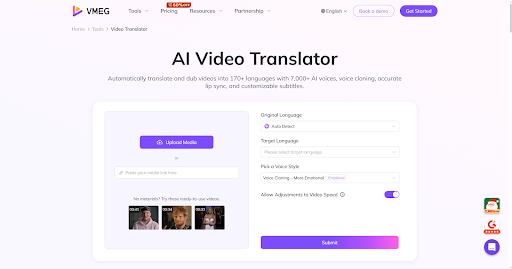
Top AI Video Translators for Gamers - VMEG AI
Key features for game video translation:
Multilingual Video Translation: Translates and dubs videos into 170+ languages and regional accents, covering most global gaming audiences.
AI Voice Dubbing: Supports 7000+ natural AI voices. And you can upload your own voice for cloning, keeping your personality or brand voice consistency.
Accurate Lip Sync: Its lip-sync technology can match dubbed audio with on-screen mouth movements, making translations look like they were originally spoken in the target language.
Subtitle Generation & Editing: Auto-generate translated subtitles and choose to adjust timing, text, and style. Embed it into your video, or download translated or original subtitles separately.
Multi-Speaker: Recognizes multiple speakers in a video and assigns different voices.
Format Support Across Platforms: Users can drag&drop local video files, or paste a link from YouTube, TikTok, Instagram, Google Drive, etc.
Pros
Easy-to-use and fast processing without learning curve.
Wide support with 170+ languages translation and 7000+ voice dubbing.
Multi-speaker auto-detection is helpful for games with dialogue-heavy narratives.
Dubbing sounds less robotic and more lifelike than other tools.
Cons
Credits for long gameplay videos can be expensive.
Quality can be influenced by complex video or bad original audio.
2. HeyGen
Best On-Camera Creator Video Translator
HeyGen is widely known for avatar video generation, but for gamers it’s the talking-head translation that localizes videos into many languages with natural voiceovers and synchronized lip movements. Game video creators or streamers can dub the spoken audio and repurpose gameplay commentaries easily.
Key features:
AI Video Translation with Dubbing: Translates original video’s spoken language with 175+ languages, including many major languages used by gaming audiences globally.
AI Dubbing: It translates and auto-generates AI voiceovers rather than just subtitles. It also clones your own voice’s tone, pitch, and style, especially helpful for personal gaming channels.
Lip-Sync: Synchronizes the audio timing to the speaker’s facial movements. Viewers can enjoy a more immersive experience.
Subtitles Generation: HeyGen auto-adds subtitles, and you can edit them manually.
Facecam Friendly Localization: Its lifelike avatars match expressions, gestures, and speech in real time, and works well for videos where your face is part of the brand.
Pros
Strong fit for on-camera creators and explainer-style videos.
Realistic dubbing quality and smooth visuals.
Wide language support for translating gaming videos or tutorials into many languages.
Cons
Complex streamer moments may not always translate perfectly.
Short clips can sometimes have off lip sync.
3. ElevenLabs
Best for Voice Quality and Creator Voice Identity
ElevenLabs is designed as an AI voice and speech platform, but also includes a powerful AI video translator and dubbing tool.
With powerful audio capability and rich voice library, it helps game developers and content creators reach international audiences quickly without re-recording voice actors. It automatically detects speakers, translates dialogue into many languages, and generates localized tracks with realistic voices
Key features
Multiple Languages: Supports translating and dubbing videos across around 29 languages.
Dubbing & Voice Cloning: Recreates the original audio with unique characteristics of each speaker, making translated audio sound natural, expressive and close to human.
Voice Library: ElevenLabs has a large library of AI-generated voices and lets you customize voice, or upload to clone.
Editing Integration: Often used with editing tools for manually processing.
Format Support: You can upload files or provide URLs from YouTube, TikTok, Vimeo, etc.
Pros
Excellent voice realism.
Great for creator identity and multilingual narration over gameplay footage.
Simple interface with fast setup.
Cons
Limited language support.
AI translation can sometimes mistranslate idioms or require manual edits.
4. Rask AI
Best for Scalable Translation and Dubbing
Rask AI is built for dubbing and localization workflows. Gamers use it to create multilingual videos, captions, voiceovers, and break language barriers. It’s frequently discussed by creators who want to translate existing scripts or multi-episode game series.
Key features:
Multilingual Translation & Dubbing: Translates gaming video and audio into 130+ languages. AI lip-sync makes dubbed gameplay clips natural.
Voice Cloning: Clones your voice like you are speaking another language, keeping personality consistent.
Multi-Speaker Recognition: Detects and dubs multiple speakers in a gaming video that has more than one host.
Auto-Generated Captions: Integrates SRT generation.
API Support: It makes larger gaming channels or studios easier to process multiple video translations.
Pros
Personalized voice cloning.
API & scalability that saves huge time.
Useful transcript tools.
Cons
Some language translation may need manual editing.
Slow or failed processes may happen.
5. Synthesia
Best for Studio-Style Multilingual Content
Synthesia is famous for AI video creation that also translates and dubs videos into many languages. Game creators can use it to localize game clips, tutorials, or promotional content for global audiences. Synthesia helps produce multilingual content with a preservation of a speaker’s voice characteristics and rhythm.
Key features
Language Support: Localize videos into 130+ languages and dialects.
Voice Preservation: AI dubbing for clear, structured narration. Preserves the original speaker’s voice and rhythm, keeping branding and personality across language.
Lip-Sync: Aligns translated audio with a speaker’s mouth movements for a more natural and immersive viewing experience, especially when creators are talking directly to viewers.
Auto-Generated Subtitles: Video is localized with ready-to-use subtitles. Users can also turn it off, or edit it manually.
Secure Translation Workflow: Synthesia emphasizes quick and secure transcript editing.
Pros
Beginner-friendly interface.
Fast processing, especially for repeated content and formats.
Polished results for structured videos like instructional content.
Cons
Limited Basic free and Starter version.
dubbing and avatars sometimes feel unnatural.
Frequently Asked Questions
Can AI video translators translate gaming slang correctly?
Most of them can handle common terms, but slang changes fast. It’s better to review the translation again. And it’s helpful for choosing a tool that can customize key phrases and brand names.
Which tool is best for social media creators?
You can try VMEG AI first that fits quick translation for social media creators.
Which tool sounds the most natural for dubbed voice?
ElevenLabs is one of the top choices for voice quality, identity and customization.
How can subtitles help for game videos?
Subtitles help with text-based accessibility. Viewers can understand it even under noisy environments. Many creators publish videos with both dubbed audio and subtitles.
Conclusion
Game video translation is a key marketing strategy for creators. It helps improve global reaching and brand value. And AI video translators make it more accessible and efficient with advanced translation and dubbing technology. They automatically convert the original audio speech with a new language like spoken by a native speaker.
This post introduced the top 5 leading AI video translators with detailed reviews. Choose the right tool that fits your needs and helps you connect with players worldwide.