Disclosure: This is a paid guest post. The author or an affiliated third party paid for its publication, and the article may contain promotional links. The views and opinions expressed are those of the author and do not necessarily reflect those of GameTyrant or its editorial staff.
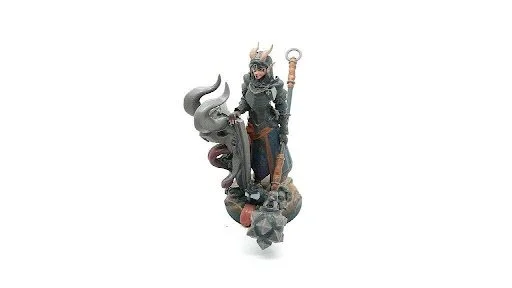
3D-printed tabletop miniature, Shapeways. Photo: ScottHShapeways, CC BY-SA 4.0, Wikimedia Commons.
A fan-made Master Sword on Sketchfab is 1.9 units long in the file. Read as millimetres that is a 1.9 mm sliver. Read as metres it is a 1.9 m blade that no printer bed on earth holds. The model is fine. Getting it from a screen to a shelf takes three steps, and the second one, the size, is where people give up.
Where the models already are
| Source | What you find | File type | Catch |
|---|---|---|---|
| Sketchfab | Fan recreations, some official showcase models | GLB, glTF, sometimes FBX | Read the licence line under the download button. CC BY and CC0 print fine, "no derivatives" means no print |
| Unity Asset Store, Fab (the Unreal store), itch.io, CGTrader | Weapons, helmets, characters built for games | FBX, GLB, OBJ | $5 to $40 per asset, plenty of free packs. The standard licence on all four allows a personal print |
| Model-ripping archives | Meshes pulled straight from the game | OBJ, FBX, DAE | Personal use only, never sell a print |
| Phone scans of a cosplay piece | Your own scan, Polycam or Scaniverse | GLB, USDZ | Scans arrive with an open bottom |
| Thingiverse, Printables, MyMiniFactory | Models already made for printing | STL, 3MF | Nothing to convert, go straight to the slicer |
Why a game file will not print as it is
| In the game file | What the slicer does | Fix | Where |
|---|---|---|---|
| Cape with no back face, hollow sleeve | Treats the mesh as paper, prints nothing or spaghetti | Make it watertight | 3D Builder or Meshmixer, 5 to 15 minutes |
| Blade 0.2 mm thick, antenna 0.4 mm | Prints air, or snaps on the first touch | Thicken to 1.5 mm | Same tools |
| 60 overlapping parts (armour plates, straps) | Reads overlaps as holes | Merge into one solid | Same tools, "Combine" or "Make Solid" |
| 4K textures and PBR materials | Ignores all of it | Nothing to do. Colour comes from the filament or the paint | — |
| 1.9 units tall | Prints 1.9 mm or tries 1.9 m | Set the size before slicing | Slicer |
Step one, the conversion
Slicers read STL and 3MF. Game files are GLB, FBX or OBJ. A fan model downloaded as master_sword.glb (6.3 MB, 48,000 triangles) dropped into FurniMesh came back as a 2.3 MB STL in under ten seconds, textures gone, geometry untouched, which is all a slicer wants. PrusaSlicer 2.9 opened it, showed a 1.9 mm sliver, and the scale box fixed that in one edit.
| Slicer | Free | Best for | Repair built in |
|---|---|---|---|
| PrusaSlicer 2.9 | Yes | Any FDM printer, clearest scale box | Yes, Netfabb on Windows |
| Bambu Studio 2.1 | Yes | Bambu printers | Yes |
| Cura 5.10 | Yes | Creality, Ender, most budget printers | Through the mesh tools plugin |
| Lychee Slicer 7 | Free tier | Resin printers, supports for figures | Basic |
Step two, the size
| Object | Print size that works | Why |
|---|---|---|
| Desk figure | 120 to 150 mm tall | Faces hold detail at this size on resin, filament needs 150 mm plus |
| Wearable helmet | Head circumference plus 10 mm, usually 590 to 610 mm around | Split into 4 to 6 pieces; no consumer bed is 25 cm tall |
| Sword or staff | Full length, split every 200 to 250 mm | Pegs or 8 mm dowel joints, glued with CA |
| Emblem, badge, keychain | 50 to 80 mm | Fast test print, under 30 minutes |
Set the size in the slicer with the lock-aspect box ticked, then split. Cutting a 900 mm sword into four pieces with the slicer's cut tool takes about five minutes. The joints want 8 mm holes and a length of wooden dowel from any hardware store.
Step three, the print
| Route | Cost for a 150 mm figure | Turnaround | Notes |
|---|---|---|---|
| Public library | $0 to $5 for material | Same week, booking needed | Hundreds of US library branches run printers; bring the STL on a USB stick |
| Makerspace day pass | $10 to $25 | Same day | Someone there will point out the thin parts before you waste a print |
| Online print service (Craftcloud, Treatstock, JLC3DP) | $14 to $45 in PLA or resin | 5 to 10 days | Upload STL, pick material, done |
| Entry printer (Bambu A1 mini, Ender 3 V3 SE) | $200 to $300 once | Overnight per part | Pays off around the third prop |
Faces and fine armour come out better in resin. Helmets and swords get handled, so they go in PLA or PETG. Craftcloud quotes both materials for the same STL on one screen, which is the quickest way to compare.
The licence line, in one table
| Situation | Allowed |
|---|---|
| Printing a fan model for your own shelf | Yes, same footing as fan art |
| Printing a paid asset-store model for yourself | Yes, every store licence checked allows personal prints |
| Printing a ripped game mesh for yourself | Grey, personal use only |
| Selling prints of any of the above | No |
First project: something with thick parts and no hair, a faction emblem or one cheek piece of a helmet. Convert, scale to 150 mm, let the slicer add supports, book the library printer for a Tuesday. Expect a layer line across the first copy. Most people print it twice.