Two things stand between you and your first Premier match: Prime Status and Profile Level 10. That's the short answer to how to unlock Premier CS2. Everything below covers the details that actually trip people up — what counts as XP, how placement matches work, what your CS Rating means once you get one, and how to play the mode once it's unlocked. For ongoing CS2 news and patch coverage while you grind toward the unlock, sites like offstage are worth bookmarking.
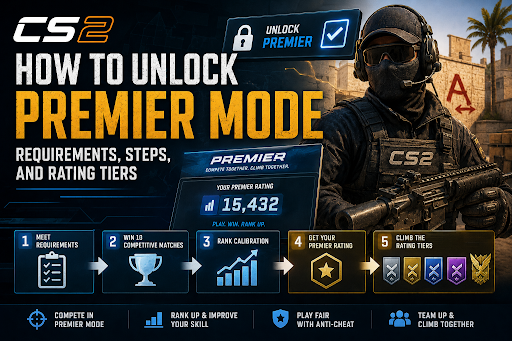
Quick Answer
| Requirement | What it means |
|---|---|
| Prime Status | One-time Steam purchase (~$14.99), or carried over automatically if you had CS:GO Prime |
| Profile Level 10 | Earned through XP in public matchmaking modes |
| 10 placement matches | Played inside Premier after unlocking it, to generate your first CS Rating |
If you already have both Prime and Level 10, Premier is already sitting in your mode list — you don't need to do anything else to access it.
Step 1: Get Prime Status
Premier queues are Prime-only, full stop. There's no free workaround, and no amount of Casual or Deathmatch hours substitutes for it.
Open Steam and go to your Library.
Click CS2 to open its store page.
Scroll to "Buy Prime Status Upgrade" and complete the purchase.
In-game, confirm the Prime badge appears next to your name in the main menu.
If you owned Prime in CS:GO, check your badge before paying again — it typically carries over automatically.
Step 2: Reach Profile Level 10
This is the part that actually takes time. Profile Level is driven by XP earned in official matchmaking modes — Casual, Deathmatch, Arms Race, Wingman, and Competitive all count.
A few things that quietly slow people down:
Private servers and workshop/community maps generally don't grant XP. If your level isn't moving despite hours of playtime, this is almost always why.
Leaving matches early can trigger cooldowns that indirectly cost you XP time.
Finishing full matches, especially wins, gives noticeably more XP than partial or abandoned games.
Deathmatch and Arms Race tend to be the fastest XP-per-hour modes since rounds are short and continuous, which makes them a solid grind if Level 10 is your only remaining blocker.
A note on accuracy: most current guides agree the gate is Profile Level 10, and that's the requirement this guide is built around. A small number of sources describe a lower "Private Rank 2" threshold instead. If your account behaves differently than described here, treat your in-game menu as the source of truth — Valve updates matchmaking requirements between patches without always announcing it widely.
Step 3: Play Your Placement Matches
Meeting Prime + Level 10 unlocks the mode, not a rank. Once you queue into Premier, your first 10 matches are placements — they're used to calculate your starting CS Rating rather than displaying a rank immediately.
After your 10th placement match, the game reveals your rating and adds you to the leaderboard. From there, every win or loss adjusts your rating directly, with the swing size depending roughly on round differential and opponent strength.
One thing worth knowing in advance: Premier runs in seasons, and each new season soft-resets ratings toward the middle. That means you'll go through a shorter re-placement process again at every season rollover, not just once when you first unlock the mode.
How CS Rating Works: The Color Tiers
Once you're placed, your CS Rating slots into one of seven color bands. Valve doesn't publish an official name for each tier, but the community-standard breakdown looks like this:
| Color | CS Rating Range | Roughly what it looks like |
|---|---|---|
| Grey | 0 – 4,999 | Fundamentals: movement, crosshair placement, basic buy discipline |
| Light Blue | 5,000 – 9,999 | Trading kills, early utility use, cleaner comms |
| Blue | 10,000 – 14,999 | Default setups, solid map knowledge, fewer solo mistakes |
| Purple | 15,000 – 19,999 | Coordinated utility, stronger veto decisions, consistent roles |
| Pink | 20,000 – 24,999 | High-skill lobbies, sharp mid-round calls, deep game understanding |
| Red | 25,000 – 29,999 | Semi-pro territory, minimal free mistakes, strong mechanics |
| Gold | 30,000+ | Leaderboard-level play |
Most of the active player base sits in the Grey-to-Blue range, so crossing into Purple already puts you ahead of the majority of players. There's no hard ceiling above Gold — the top of the leaderboard climbs well past 30,000.
How to Play Premier CS2: What Actually Happens in a Match
If you're wondering how to play Premier CS2 beyond just queuing up, here's the structure that makes it different from Casual or Deathmatch:
Queue solo or as a party. Premier supports both, unlike some stricter ranked formats.
Map veto phase. Before the match starts, both teams take turns banning maps from the Active Duty pool until one remains. This is why Premier rewards players who are competent on the whole map pool, not just one or two favorites.
Side decision. After the last map survives the veto, the losing team from the veto (or a coin-flip equivalent) typically gets to choose starting side.
MR12 format. Matches are played to a maximum of 12 rounds per half, with overtime triggered if the score is tied 12-12 at the end of regulation.
Post-match rating update. Your CS Rating adjusts immediately after the final round, and you can see the change on your profile.
Because every match uses a full veto and the entire active map pool, Premier generally punishes one-map specialists more than Competitive does — it's worth reviewing your weaker maps before queuing seriously.
FAQ
Do I need a certain number of wins to unlock Premier CS2? No. Wins aren't required to unlock the mode — only Prime Status and Level 10 are. The 10-win placement requirement applies after unlocking, to generate your CS Rating.
Can I unlock Premier mode in CS2 without Prime? No. Prime Status is mandatory and there's no current workaround, regardless of playtime in other modes.
How long does it take to unlock Premier in CS2? It depends entirely on your existing XP. Starting from a brand-new account, reaching Level 10 usually takes several hours of public matchmaking; playing efficient XP modes like Deathmatch can shorten that noticeably.
I'm Level 10 with Prime active, but I still don't see Premier in my menu. What's wrong? Double-check the Prime badge is actually showing next to your profile name — sometimes a purchase doesn't sync immediately. Restarting the client after purchase usually resolves display issues.
Is Premier better than Competitive mode? Depends on the goal. Premier gives you one global rating and forces map-pool versatility through its veto system, which suits players chasing a single measurable rank. Competitive's per-map ranks make it a lower-pressure way to learn a new map without touching an overall score.
Does my CS Rating reset every season? It soft-resets toward the middle rather than wiping to zero, and you'll play a shorter placement stretch to re-establish your rating each season.