If you’re dealing with the Steam “verification code not sending” issue, it’s usually caused by carrier delays, routing problems, overloaded towers, or temporary blocks on the number you’re trying to use. Steam depends heavily on SMS verification, so even a minor disruption can prevent the message from arriving. One of the fastest fixes is simply switching to a fresh temporary number, which avoids rate limits and network bottlenecks, but several other quick checks can solve the problem just as effectively.
Fix #1: Use a Temporary Phone Number to Get the Code Instantly
One of the fastest ways to break out of the Steam “verification code not sending” loop is to switch to a temporary phone number. In many cases, the issue isn’t with Steam at all — it’s your carrier. Mobile networks sometimes throttle verification messages, especially when traffic spikes, local towers are overloaded, or your number has recently handled too many login requests.
A fresh temporary number avoids all of those network-side bottlenecks. Because it hasn’t been rate-limited, flagged, or caught in an outage, Steam can usually deliver the SMS right away. It’s a simple solution that works especially well when:
Your provider is facing regional delays
Your number is temporarily blocked for verification traffic
Steam has rate-limited previous attempts
Many users have found that once they switch to a clean number, the code finally arrives. Temporary number platforms offer quick access to fresh numbers you can use for the verification step. You simply choose a number, request the code, and read it directly on the platform — no waiting for your carrier to cooperate.
Popular Temporary Number Services
| Service | Type | Best For | Notes |
|---|---|---|---|
| SMSFAST | Web-based | Instant verification | High anonymity, fast delivery |
| TextNow | App & Web | Account verification | Free & paid options, medium-term use |
| Hushed | App | One-time or ongoing | Supports SMS & calls, private |
| Receive SMS Online | Web | Quick disposable use | No registration required, short-term numbers |
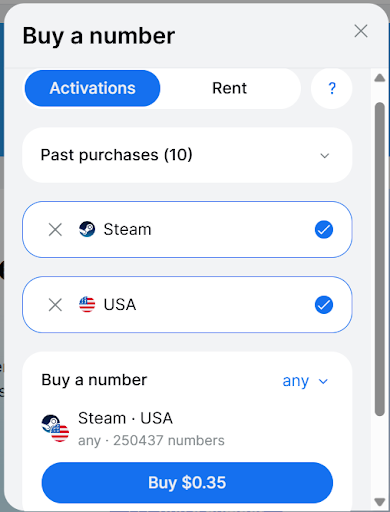
Example: How to Get a Temporary Number on SMSFAST
It’s not meant to replace your main number long-term, but it’s often the fastest way to get an instant workaround when your usual SIM stops receiving anything from Steam.
Fix #2: Check Your Signal Strength & Carrier Status
Even though using a temporary number can be a fast workaround, it’s still worth confirming that your own mobile signal or carrier isn’t the reason the code never arrives. Weak reception, a congested cell tower, or a temporary outage can block verification SMS before they even reach your device. Steam’s messages depend on stable routing, so if your connection drops or fluctuates, the code may never show up.
If you’re on your SIM, try moving to an area with a stronger signal or toggling airplane mode to force a reconnection. A quick check here saves time and rules out one of the most common causes of missing verification codes.
Fix #3: Make Sure You Entered the Number Correctly
It might feel obvious, but typos and formatting mistakes are among the top reasons Steam can’t send verification codes. A single wrong digit, a missing “+” sign, or choosing the wrong country prefix will cause the message to fail silently. Many people also reuse old numbers stored in their account settings without realizing those numbers are outdated or inactive.
If you’re using a temporary number, double-check the full international format before submitting it. Make sure the number matches the exact country you selected on Steam, and verify that you copied it from the platform correctly — especially if the service refreshes or regenerates numbers quickly.
Taking an extra 10 seconds here ensures the code is actually being sent to the right destination, which is often all that’s needed to fix the issue and move forward.
Fix #4: Wait 10–15 Minutes & Resend
Steam has built-in rate limits to prevent abuse, which means requesting too many verification codes in a short period can trigger a temporary hold. When that happens, even if everything else is working perfectly, no new messages will be delivered until the cooldown expires.
Giving it 10–15 minutes before trying again allows Steam’s system to reset. If you’re using a temporary number and still don’t see the SMS after waiting, switching to a fresh number often solves the problem immediately. A clean number hasn’t hit any rate limits, so Steam can route the message without restrictions. This simple swap frequently resolves those frustrating moments where the platform appears stuck.
Fix #5: Disable VPN & Use a Stable Network
VPN usage is a surprisingly common reason verification codes get delayed or blocked. When Steam sees a mismatch between your IP location and the country of the phone number you’re using, its security system may hold or reject the SMS request entirely. Unstable Wi-Fi and constantly changing IP routes can trigger similar issues.
Turning off your VPN — even temporarily — helps Steam verify that your request is legitimate and lets the message pass through normally. This matters even more if you’re using a temporary number, since the number’s country and IP region need to align more closely to avoid Steam’s automated filters. A stable, direct internet connection is often all it takes to get the code to appear.
Fix #6: Clear Steam Client Cache & Restart
Sometimes the issue isn’t with your phone number at all — it’s the Steam client getting stuck. When cached login data becomes outdated or corrupted, Steam may enter a “pending verification” state where it keeps waiting for a code that was already sent or never properly requested. Clearing the client cache resets all temporary login files and forces Steam to start a fresh verification attempt.
After clearing the cache, restart the client completely rather than just minimizing it. This gives Steam a clean slate to re-trigger the SMS request, which often fixes cases where the platform simply wasn’t sending anything due to a local glitch.
Fix #7: Switch to Email Verification Instead
If both your SIM and a temporary number refuse to receive the code, switching to email verification is the quickest alternative. Steam usually delivers email-based codes instantly, and you can use them for login, device confirmation, or account recovery.
This method is especially helpful during network congestion or when Steam temporarily limits SMS delivery for security reasons. Switching to email gets you moving again without waiting on your carrier or refreshing multiple temporary numbers.
Fix #8: Check If Steam Flagged the Number
Steam’s security system sometimes blocks phone numbers that show unusually high verification traffic. This can happen when a number has been used repeatedly across multiple accounts or when the system detects patterns that resemble automated activity. Once a number is flagged, Steam may silently reject new SMS requests, making it look like the code simply isn’t sending.
This affects both regular mobile numbers and temporary-number services. Carriers can recycle numbers that were previously overused, and some temporary platforms may assign numbers that have already passed through a lot of verification attempts. If you suspect this is the case, switching to a fresh number—whether on your SIM or through a temporary service—usually resolves the issue right away. A clean number avoids Steam’s internal filters and restores normal delivery.
Fix #9: Contact Steam Support
If you’ve tried multiple numbers, waited out rate limits, and still can’t get a single code, it’s time to contact Steam Support. At that point, the issue is likely tied to your account’s security status or an internal verification lock that only Steam can clear.
When you submit a ticket, include the specific times you attempted to request the code and, if possible, a screenshot showing the failed or stuck verification screen. These details help Steam identify whether your account triggered an automated safety block or if the problem lies on their end. While response times can vary, support typically resolves SMS-related issues once they have enough information to investigate.
Conclusion
Running into the Steam “verification code not sending” issue can be incredibly frustrating, but in most cases, the problem has a simple solution. The quickest ways to fix it include:
Try a temporary number to bypass carrier delays and rate limits.
Disable your VPN and use a stable network to avoid regional mismatches.
Switch to email verification when SMS simply refuses to arrive.
Following these steps resolves the majority of verification problems without needing to wait for support or troubleshoot for hours. With the right approach, you can get your Steam code delivered, regain access to your account, and prevent the same issue in the future. If none of these fixes work, Steam Support can always step in—but most users won’t need to go that far.