When it comes to AI video creation, two standout tools dominate the scene — Vidnoz AI and HeyGen. But the real question is: which one comes out on top? Both tools offer innovative features designed to simplify video production, from lifelike avatars and text-to-speech capabilities to advanced customization options, making the choice between them less straightforward. In this guide, we will provide a complete overview of Vindoz AI and HeyGen and help you decide which AI video tool is the right fit for your content creation needs.
Part 1: What is HeyGen?
HeyGen is an AI Text-to-Video service developed by HeyGen Labs. It helps businesses of all sizes create engaging AI videos for various use cases requiring explanation, from training to marketing & sales. It supports high-quality avatars, multilingual voiceovers, templates, and branding tools. The standout feature of HeyGen is that it offers an intuitive interface, which is best for non-tech and beginner users.
Key Features of HeyGen
AI Avatars: HeyGen offers 120+ AI avatars, covering diverse ages and professions. Users can also create custom avatars by uploading their own photos or video clips.
Multilingual Voiceovers: The program supports 40+ languages and 300+ voice styles, enabling creators to produce videos for global audiences.
Templates: HeyGen includes a variety of video templates that arrange various elements such as text, image, and music along with your AI avatar.
AI Voice Cloning: HeyGen's voice cloning feature uses AI technology to create a lifelike copy of a natural human voice. The audio quality is clear without any background noise.
Intuitive Interface: The best part of this tool is that it offers an intuitive interface, allowing users with zero editing experience to produce high-quality videos.
Part 2: What is Vidnoz AI?
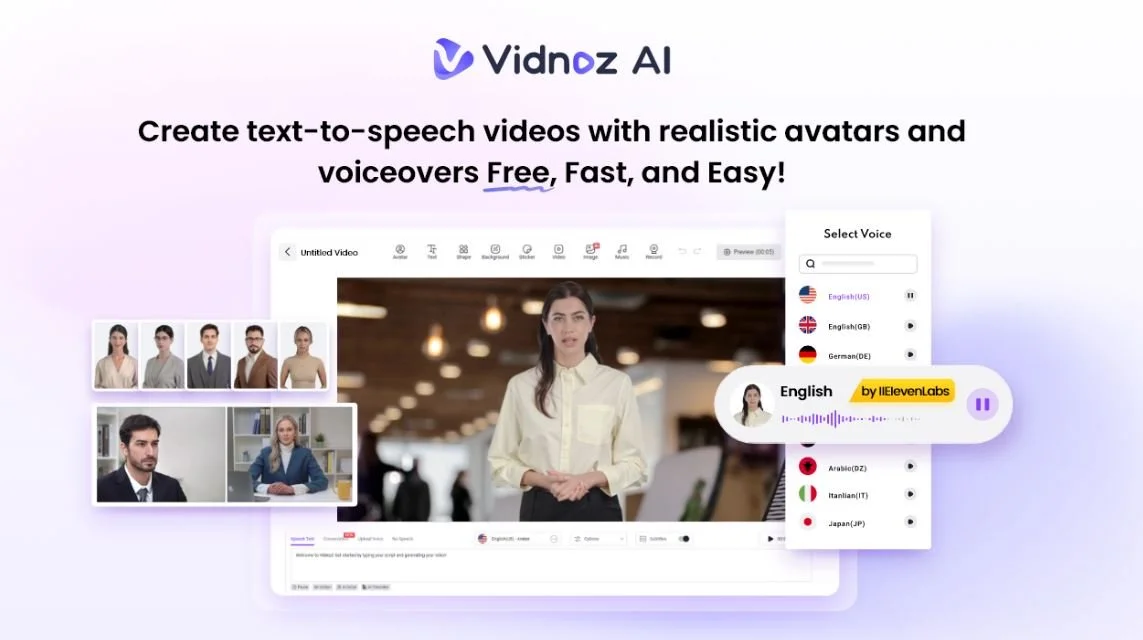
Vidnoz AI is the best AI video creation tool available in 2025. It uses artificial intelligence to create high-quality videos without any professional help. Certified with ISO/IEC 27001: 2022, ensuring strict data security and compliance standards, which makes it a trusted choice for handling sensitive information. Using 2800+ video templates, 1700+ realistic avatars, and massive video-creating materials for hundreds of different scenarios, users can generate professional-looking videos immediately with no hassle.
Key Features of Vidnoz AI:
Lifelike Avatars: Vidnoz AI offers 1700+ realistic avatars from various industries such as doctors, hosts, students, and more. Vidnoz Avatars also includes features like Avatar Lite for creating a digital twin and Avatar Pro for deeper customization.
Customizable Templates: The program includes 2800+ video templates, enabling users to create different types of videos such as breaking news, how-to guides, product demo videos, and more.
High-Quality AI Voices: It offers 1830+ AI voices, all powered by popular platforms such as ElevenLabs, Google, and Microsoft. Vidnoz voices are available in 140+ languages, including English and Spanish.
AI Video Wizard: The standout feature of Vidnoz AI is that it allows users to create engaging videos using a single text prompt or any source material. No professional help or editing skills required.
Free to Use: Vidnoz AI offers a free plan, designed for casual or beginner users. The free version allows users to create a 3-minute video daily and offers features like Avatar Lite, Voice Cloning, and Online Video Editor.
Part 3: Vidnoz AI vs. HeyGen: Which Tool is Better?
Both Vidnoz AI and HeyGen offer amazing features, making it hard to decide which one is better. To make your decision easier, we’ve put together the comparison table below to help you choose the right tool:
| Features | Vidnoz AI | HeyGen |
|---|---|---|
| AI Avatars | 1700+ AI Avatars | 100+ AI Avatars |
| Voice and Languages | 1830+ AI Voices and 140+ Languages | 300+ AI voices and 30+ Languages |
| Video Templates | 2800+ Pre-Designed Video Templates | 200+ Video Templates |
| Ease of Use | Intuitive Interface | Straightforward |
| Compatibility | Android, iOS, Windows, macOS | Windows and macOS |
| Dual Conversation Mode | Yes | No |
| Team Collaboration | 1000+ Members | None |
| Best For | Marketers, Educators, Business, Content Creators | Content Creators, Marketers |
| Pricing | Free to Use | $29/mo |
Part 4: How to Use Vidnoz AI To Create High-Quality Videos?
Follow the instructions below to learn how to create high-quality videos with Vindoz AI:
Go to Vidnoz AI's official site and log in with your free account. Choose video templates and avatars.
Enter your video script and select the desired AI voice. Users also have the option to select the language of their video.
Use Online Video Editor to perform customizations. With this tool, you can add background music, change video templates, and add text.
Click on the “Generate” button to begin the video creation process. Within seconds, your video will be ready and available to download.
Part 5: Conclusion: Which Tool is Better
After carefully comparing both AI video creation tools, we’ve concluded that Vindoz AI comes out on top. This program offers amazing features and high-quality outputs. Further, it includes free AI tools such as AI Voice Changer, Online Video Editor, AI Headshot Generator, and more.