Remote gaming has transformed the way gamers access their favorite titles. Instead of being tied to a single gaming PC, players can stream their games from anywhere with a stable internet connection. While several remote desktop solutions exist, two names often come up in discussions: Parsec and StarDesk.
Both platforms are designed to provide low-latency remote access, but they serve different audiences and offer unique advantages. If you're deciding which platform best suits your gaming needs, this guide compares their performance, features, ease of use, and overall gaming experience.
What Is Parsec?
Parsec is a remote desktop application originally built for gamers. It focuses on delivering ultra-low latency streaming, allowing users to access their gaming PCs from almost anywhere. Over the years, it has expanded into remote collaboration and professional workflows, making it popular among creative teams as well.
Its reputation comes from responsive gameplay, high frame rates, and support for multiplayer gaming over the internet.
What Is StarDesk?
StarDesk is a modern remote gaming platform built specifically for users who want a smooth, responsive, and secure remote gaming experience. Whether you're playing AAA titles, competitive esports games, or indie favorites, StarDesk focuses on minimizing input lag while maintaining excellent image quality.
If you're looking for a detailed comparison between these two platforms, check out Parsec vs StarDesk, where you'll find an in-depth breakdown of their features and performance.
Performance Comparison
Performance is one of the biggest factors when choosing a remote gaming solution.
Latency
Low latency is essential for competitive gaming. Every millisecond counts, especially in fast-paced games like first-person shooters or racing simulators.
Both platforms are optimized for low latency, but actual performance depends on factors such as:
Internet speed
Connection stability
Hardware specifications
Distance between host and client
StarDesk has been designed specifically for remote gaming, offering responsive controls that help reduce noticeable input delay during gameplay.
Video Quality
A good remote gaming platform should deliver crisp visuals without excessive compression.
Both solutions support high-resolution streaming, including:
1080p gaming
High refresh rates
Smooth frame delivery
StarDesk automatically adjusts streaming quality based on network conditions, helping maintain consistent gameplay even when bandwidth fluctuates.
Ease of Setup
Nobody wants to spend hours configuring software before playing.
Parsec
Parsec offers a relatively simple installation process, but new users may need to adjust network settings, permissions, or account configurations depending on their setup.
StarDesk
StarDesk emphasizes simplicity. Installation is straightforward, allowing users to connect to their gaming PC with minimal configuration. This makes it appealing for gamers who prefer spending time playing instead of troubleshooting technical settings.
Gaming Features
Remote gaming software should provide more than basic screen sharing.
Some important gaming features include:
Low-latency input
High FPS streaming
Controller support
Keyboard and mouse compatibility
Stable audio transmission
Secure remote connections
StarDesk focuses heavily on gaming performance, making it suitable for players who want a dedicated remote gaming solution rather than a general-purpose remote desktop application.
Security Matters
Security is often overlooked when choosing remote desktop software.
Both platforms use encrypted connections to protect user data during remote sessions. However, users should always enable strong passwords, two-factor authentication when available, and keep software updated to minimize security risks.
Secure remote access becomes especially important if you're connecting over public Wi-Fi or traveling frequently.
Cross-Platform Compatibility
Modern gamers often switch between multiple devices.
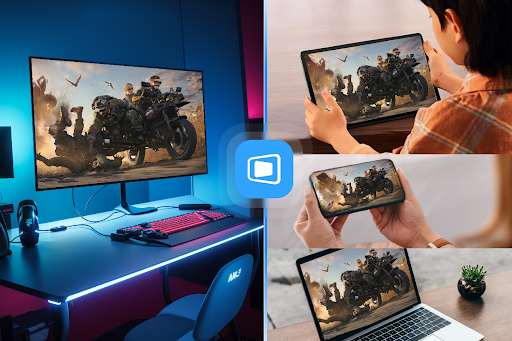
Both Parsec and StarDesk support various operating systems, allowing users to connect from desktops and laptops with ease.
This flexibility means you can leave your powerful gaming PC at home while accessing it remotely from another location.
Which One Is Better for Remote Gaming?
The answer depends on your priorities.
Choose Parsec if you:
Already use it for remote collaboration
Need professional workflow features
Want a mature platform with a large user base
Choose StarDesk if you:
Primarily want remote gaming
Prefer an easy setup process
Want responsive gameplay with minimal distractions
Need a platform focused specifically on gamers
For players whose main goal is gaming rather than remote work, StarDesk provides a streamlined experience designed around performance and simplicity.
How to Get Started
Getting started with StarDesk only takes a few minutes.
Simply download StarDesk remote, install it on your gaming PC, and connect using your preferred device. Once connected, you'll be able to access your game library remotely while enjoying smooth controls and high-quality streaming.
Before playing, it's recommended to:
Use a wired Ethernet connection whenever possible.
Ensure your host PC meets your game's hardware requirements.
Close unnecessary background applications.
Keep GPU drivers updated.
Use a fast, stable internet connection.
These small optimizations can significantly improve your remote gaming experience.
Final Thoughts
Remote gaming continues to improve as internet speeds and streaming technologies evolve. Both Parsec and StarDesk offer reliable remote access, but their strengths appeal to different users.
If you need collaboration tools alongside gaming, Parsec remains a strong option. However, if your primary focus is achieving a smooth, gaming-first remote desktop experience with minimal setup, StarDesk is an excellent choice.
Whether you're traveling, working away from home, or simply want the flexibility to access your gaming PC from anywhere, choosing the right remote gaming platform can greatly enhance your overall experience. Comparing the available features and selecting the solution that matches your gaming habits will ensure you get the best possible performance every time you connect.