The March title update changed FC 26's core gameplay mechanics in ways that rendered previous slider configurations obsolete. EA adjusted defensive AI positioning, passing accuracy curves, and shooting assistance levels to address community complaints about unrealistic gameplay. These changes mean the slider settings that created balanced matches in February now produce broken experiences where either the AI dominates unfairly or sits passively allowing easy victories.
For players who want to skip the testing phase and jump straight into optimized gameplay, services offering buy FC 26 coins can help build competitive squads while you dial in perfect settings for your playstyle.
What the March Update Actually Changed
Before diving into specific slider recommendations, you need to understand EA's patch notes and the hidden changes they didn't announce. The official update addressed "defensive AI awareness in transition situations" and "adjusted shooting power calculations for long-range efforts." Translation: defenders no longer ball-watch as aggressively, and 30-yard screamers happen less frequently.
Here's the thing: EA also tweaked pass assistance strength and first-touch error rates without documenting these changes. Players noticed immediately that passing felt different, with assisted passes going to unintended targets more often and manual passing requiring more precision than before the patch. These undocumented adjustments mean your old slider settings might be fighting against the new base mechanics rather than complementing them.
Core Slider Philosophy Post-Update
The goal with any slider configuration involves creating realistic, challenging matches that feel fair regardless of outcome. You want the AI to play intelligently without cheating through boosted stats. Your own team should execute properly when you input correct commands but shouldn't auto-correct mistakes through excessive assistance.
Post-March update, achieving this balance requires reducing certain sliders that previously sat at default values. EA's AI improvements mean you can dial back sliders that compensated for poor base AI behavior. Simultaneously, you need to increase sliders that counteract the new assisted passing issues introduced by undocumented changes.
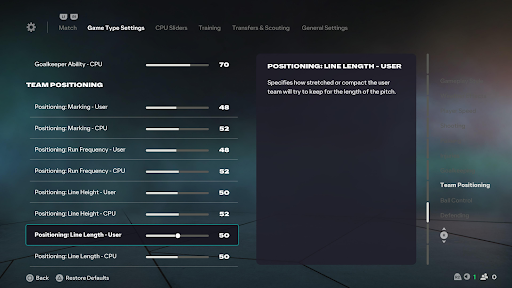
Recommended Slider Settings
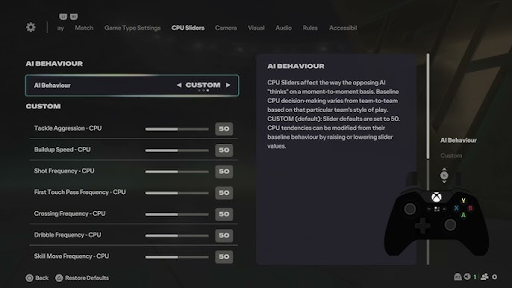
These configurations assume you're playing on Legendary or Ultimate difficulty in Career Mode or Seasons. Lower difficulties require different adjustments because the AI already plays less aggressively.
| Slider | Recommended Value | Explanation |
|---|---|---|
| Sprint Speed | 48 | Slight reduction prevents ice skating effect |
| Acceleration | 49 | Keeps pace feeling realistic without sluggishness |
| Shot Error | 55 | Increases difficulty on finishing, rewards placement |
| Pass Error | 60 | Counters over-assisted passing from March update |
| Shot Speed | 48 | Prevents unrealistic rocket shots |
| Pass Speed | 45 | Slows build-up, rewards patient play |
| Injury Frequency | 55 | Adds realism without constant injuries |
| Injury Severity | 45 | Keeps most injuries under 2 weeks |
| Goalkeeper Ability | 48 | Slight reduction fixes post-patch super keepers |
| Marking | 52 | Tightens defensive shape |
| Run Frequency | 55 | Increases attacking runs from midfield |
| Line Height | 52 | Pushes defensive line higher for more realistic spacing |
| Line Length | 48 | Compacts team shape horizontally |
| Line Width | 50 | Default width works well post-update |
| Fullback Positioning | 55 | Encourages overlapping runs |
| Slider | Recommended Value | Explanation |
|---|---|---|
| Sprint Speed | 50 | Keep default, update fixed AI speed issues |
| Acceleration | 50 | Default creates fair pace matchups |
| Shot Error | 60 | Prevents AI from scoring every shot |
| Pass Error | 58 | Makes AI passing more human-like |
| Shot Speed | 50 | Default works well after patch changes |
| Pass Speed | 48 | Gives you time to intercept AI passes |
| Goalkeeper Ability | 52 | Slight boost prevents too many easy goals |
| Marking | 48 | Creates space for your attacking play |
| Run Frequency | 50 | Default provides balanced AI attacks |
| Line Height | 48 | Prevents AI from sitting too deep |
| Line Length | 50 | Default creates natural defensive shape |
| Line Width | 50 | Balanced width allows wing play |
| Fullback Positioning | 50 | Default prevents exploitable gaps |
Key Adjustments Explained
Pass Error Increase
The most critical change involves raising pass error to 60 for user and 58 for CPU. The March update strengthened pass assistance to help casual players, but this makes the game feel automated for experienced players. Higher pass error forces you to aim passes more carefully and punishes sloppy directional inputs that the game would otherwise auto-correct.
This adjustment separates skilled passers from button mashers. You'll complete fewer passes initially as you adjust to requiring precision, but your overall play quality improves dramatically once you adapt. On the flip side, some players find this surprisingly frustrating at first because they've become dependent on assistance bailing out poor decisions.
Shot Error Calibration
Both user and CPU shot error need increases to combat the update's improved shooting mechanics. EA made it easier to score from tight angles and awkward body positions, which sounds good in theory but creates unrealistic score lines where matches end 5-4 regularly. Raising shot error to 55 (user) and 60 (CPU) brings finishing difficulty back to reasonable levels.
These values mean you need clean looks at goal and good shooting technique to score consistently. Rushed shots from poor positions miss more often, rewarding patient build-up play over spamming shot attempts whenever you enter the box.
Goalkeeper Rebalancing
The update buffed goalkeepers significantly, particularly their reflexes on close-range efforts. Default sliders now produce keepers who make impossible saves routinely. Reducing user goalkeeper ability to 48 while boosting CPU keeper ability to 52 creates an interesting dynamic where you face competent but beatable goalkeepers while your own keeper doesn't bail you out of defensive mistakes constantly.
Many players find this surprisingly effective because it forces you to take defensive positioning seriously rather than relying on superhuman goalkeeping to clean up errors. For those looking to improve their defensive skills quickly without the grinding learning curve, EA FC 26 boosting services can help you understand optimal defensive positioning through guided gameplay sessions.
Difficulty-Specific Tweaks
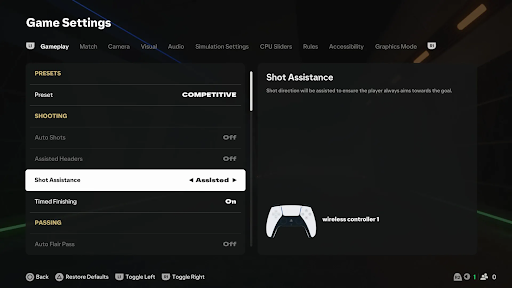
These baseline settings work best on Legendary difficulty. If you're playing on different difficulty levels, adjust accordingly.
World Class Adjustments
Reduce CPU Shot Error to 55 (AI doesn't finish as clinically on World Class)
Increase CPU Marking to 50 (AI defends less aggressively by default)
Lower User Pass Error to 58 (World Class AI pressure is less intense)
Ultimate Difficulty Modifications
Increase CPU Shot Error to 65 (Ultimate AI is too clinical otherwise)
Reduce CPU Sprint Speed to 48 (counters unfair AI speed boost)
Raise User Goalkeeper Ability to 50 (you need better saves against relentless pressure)
Testing and Fine-Tuning
These settings provide a strong baseline, but you'll need to test them across multiple matches and adjust based on your personal preferences. Play at least 5-6 full matches before making changes because individual match variance can mislead you about whether settings are working.
Track specific metrics during your testing period. Note average goals per game, shot conversion rates, and whether matches feel competitive throughout or become one-sided. If you're consistently winning 4-0 or losing by similar margins, the settings need adjustment. Target final scores around 2-1 or 3-2 for realistic difficulty balance. Some dedicated players even use FC 26 boosting to simulate multiple seasons quickly with different slider configurations, identifying optimal settings through rapid iteration rather than months of manual testing.