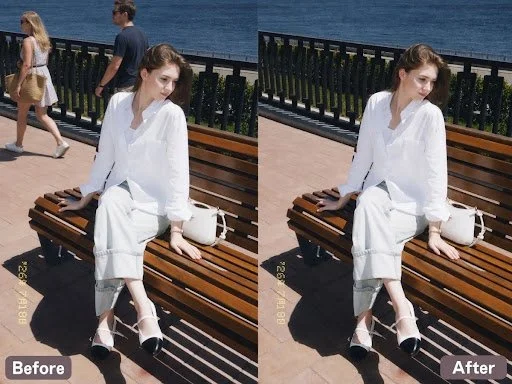
Finding the perfect framing for a landscape shot, an architectural photograph, or a candid street memory often feels like a race against the clock. Just as the lighting peaks or a subject falls into natural alignment, a stray tourist or an accidental passerby steps right into the frame. Every creator knows the frustration of reviewing a batch of otherwise stunning captures only to find them cluttered with unintentional distractions. Whether you are managing digital content portfolios, preparing marketing visuals, or curating personal travel albums, visual noise draws the eye away from the true subject. Capturing a pristine shot in crowded public spaces is rarely straightforward, which makes post-processing cleanup an essential step for digital creators, casual photographers, and content managers alike.
Rather than letting photobombers ruin an otherwise flawless composition, modern machine learning algorithms make it remarkably simple to remove people from photos with seamless precision. Below is an analytical breakdown of the seven best applications available this year to help you restore clarity and focus to your images.
Detailed Review of the Top 7 AI Tools to Remove People from Photos
1. BeautyPlus (iOS / Android / Web)
BeautyPlus offers a specialized remove people from photos online tool featuring both Auto and Manual modes for flexible editing. Users can effortlessly highlight the unwanted person to whisk them away with no trace left behind, or utilize dedicated cleanup options tailored for People, Text, Watermark, and Wrinkles. Beyond object and crowd removal, users can also explore broader visual cleanup utilities such as its watermark remover to handle cleanups across various digital assets.
Best Use Case: Ideal for mobile creators, social media managers, and everyday users who need fast, precise object eradication on mobile or desktop devices.
Pros:
Highly intuitive brush selection that isolates subjects accurately.
Natural background synthesis that prevents noticeable blurring or smudging.
Comprehensive suite of supplementary editing features for quick touch-ups.
Cons:
Advanced batch-processing options require premium access.
Heavy reliance on stable internet connectivity for cloud-backed AI rendering.
2. Pixelbin (Web)
Pixelbin offers an AI-powered photo editing tool focused on removing people and unwanted elements from images. The interface features a clean, stream-lined workspace with model options (such as "Nano Banana") and aspect ratio selectors, accompanied by a clear "Remove People Now" action button. It also provides a direct Before/After comparison view and an easy download option.
Best Use Case: Ideal for everyday users and content creators looking for a fast, straightforward online utility to quickly clean up and remove people from digital photographs.
Pros:
Clean, minimalist interface that prioritizes a fast and straightforward user experience.
Clear Before/After comparison layout with an accessible download button for processed images.
Model and aspect ratio selection drop-downs for flexible output configurations.
Cons:
Limited advanced manual selection or brush-tweaking tools compared to heavy design suites.
Free and paid limits are governed by platform credits and enterprise cloud pricing tiers.
3. Picsart (Web)
Picsart provides a comprehensive AI-powered removal tool featuring multiple selection areas such as brush painting, click selection, AI object recognition, and text-based prompts where users can describe what they want to remove. It also offers convenient smart presets including Skin Retouch, Fix hair, Clean products, Fix reflections, Fix shadows, Clean streets, Remove crowds, Remove clutter, and Remove text.
Best Use Case: Ideal for social media creators, digital marketers, and casual editors who want a versatile, feature-rich web editor with smart category presets for rapid touch-ups and object cleanup.
Pros:
Highly versatile selection options combining manual brushes, click tools, and text prompts for AI-driven object removal.
Extensive library of one-click presets tailored for specific cleanup tasks like removing crowds, text, reflections, and blemishes.
Real-time before-and-after workspace layout with responsive canvas scaling and export options.
Cons:
Advanced AI generation features and high-volume usage are metered by a credit system (e.g., indicating a credit cost per execution).
The feature-dense interface can feel slightly cluttered for users seeking a simple, single-purpose cleanup tool.
4. Adobe Firefly (Web)
Adobe Firefly offers an advanced object removal tool driven by Generative AI, allowing users to effortlessly brush over unwanted people or objects and seamlessly fill the area while keeping the background natural and realistic. It features adjustable brush sizes and hardness, alongside "Select more" and "Select less" options for precise masking control. Beyond object and person removal, the platform integrates comprehensive creative utilities such as Generative Fill, crop and expand, upscale, and background removal.
Best Use Case: Ideal for designers, professional creators, and marketing teams who require advanced generative image editing, complex background reconstruction, and high-quality commercial content production.
Pros:
Exceptional generative AI removal and background reconstruction powered by Adobe's robust imaging technology.
Precise selection controls including brush size/hardness adjustments and additive/subtractive masking tools.
Comprehensive suite of professional editing features built into a unified creative workspace.
Cons:
Premium features and high-resolution generative workflows require a paid Adobe subscription or credit allocation.
Steeper learning curve and heavier web interface compared to lightweight, single-purpose cleanup tools.
5. Pixelcut (Web)
Pixelcut provides a streamlined object removal and retouching tool powered by AI. Users can easily brush over unwanted elements using the Retouch (Erase) feature with adjustable brush sizes. Beyond object removal, the platform integrates a comprehensive suite of editing tools in the left sidebar, including Background editing, Expand (canvas extension), Upscale, and Enhance. Users can also utilize Batch Edit capabilities and transition directly into the Designer workflow.
Best Use Case: Ideal for e-commerce sellers, marketers, and content creators who need a fast, all-in-one AI image editing platform tailored for product photography cleanup and visual content production.
Pros:
Clean and intuitive interface featuring real-time Before/After comparisons and flexible canvas zoom controls.
Comprehensive suite of adjacent tools like Upscale, Enhance, and Background editing within a single workflow.
Support for batch editing and seamless continuation into the Designer workspace.
Cons:
Advanced high-resolution exports and certain batch capabilities require a Pro subscription.
Limited to manual brush removal without advanced automated multi-object selection modes.
6. Fotor (Web)
Fotor features an AI-driven "Magic Eraser" tool that offers categorized removal options including Object, Watermark, and Passersby, allowing users to efficiently clean up photos with targeted modes. It also includes batch editing capabilities and a multi-image upload panel on the right sidebar for managing multiple files at once.
Best Use Case: Ideal for general consumers, content creators, and casual marketers looking for an online photo editing platform with quick, category-specific cleanup tools and batch processing support.
Pros:
Dedicated categorization modes for distinct tasks like removing objects, watermarks, and passersby.
Built-in batch editor and multi-image panel to streamline the workflow for handling multiple photos.
Clean side-by-side preview and intuitive canvas controls for checking editing results.
Cons:
Advanced magic removal features and high-volume batch operations are metered by credit consumption or require a Pro upgrade.
The feature-rich interface can sometimes feel overwhelming for users who only need a basic, one-tap eraser.
7. Kaze.ai (Web)
Kaze AI provides an intelligent, prompt-driven photo editing utility specialized in removing people and unwanted elements from images. Instead of traditional manual brushing, users can upload an image and type or select natural language text prompts (such as "Remove all people from the background", "Remove the person in blue", or "Keep person in the center") to direct the AI. It features dedicated editing modes, model switches (like Kaze Flash), aspect ratio controls, and a diverse sidebar gallery for inspiration.
Best Use Case: Ideal for creators, social media users, and general consumers who prefer a conversational, text-prompt-driven AI approach to automatically isolate or remove specific people and subjects from photos without tedious manual masking.
Pros:
Advanced prompt-based editing allowing precise, natural-language commands (e.g., removing specific people based on position or color).
Clean, modern web interface with integrated model speed options and a side gallery.
Fast, automated processing tailored for effortless background and crowd cleanup.
Cons:
Lacks traditional manual brush sizing or fine-grained touch-up tools for users who prefer hands-on masking control.
Relies on web connectivity and system prompt interpretation, which may require re-phrasing prompts for complex scenes.
Why Removing Unwanted People Changes Everything
When capturing important moments or striking compositions, the biggest hurdle is rarely the lighting or the equipment—it is the unpredictable background noise. Random pedestrians, stray tourists, and unexpected photobombers frequently disrupt what would otherwise be a pristine frame.
Cleaning up these visual distractions addresses several core pain points:
Fixing Distracting Backgrounds: Erasing random bypassers and stray tourists ensures that the viewer’s eye immediately locks onto your actual subject instead of wandering around a messy frame.
Saving Once-Ruined Shots: Photos captured at iconic landmarks, tourist hotspots, or crowded public spots no longer need to be thrown away just because an unexpected crowd ruined the background.
Elevating Social Media Presence: Clean, distraction-free images look intentional and professional, helping your posts stand out instantly in crowded feeds on Instagram, TikTok, or professional portfolios.
Skipping Tedious Editing: Instantly wiping away unwanted elements gives your image a polished balance without forcing you to spend hours manually cloning pixels, painting masks, or learning complex desktop software.
Final Thoughts
Finding the right tool to remove people from photos ultimately comes down to matching your specific workflow and creative needs. Whether you need a quick, on-the-go mobile fix for social media or heavy, enterprise-grade generative blending for commercial portfolios, today's AI-driven options offer unprecedented speed and precision. By picking the application that best fits your environment, you can stop letting background distractions compromise your best shots and start publishing clean, professional imagery every time.