For how much loot you can acquire in this looter shooter, you can’t be running around with small pockets. That’s essentially how you start in Borderlands 4, and if you’re a gun and gear hoarder, it can get frustrating.
Luckily, there are ways to hold more items at a time, but it takes some time and effort to do so. Let’s explain how you can increase your inventory space in Borderlands 4 so you can hold as much loot as you please.
How to increase inventory space in Borderlands 4
The only way you can increase your inventory space in Borderlands 4 is by purchasing Backpack upgrades in the SDU screen. In one of the very early campaign missions, you’ll learn about SDU, also known as Storage Deck Upgrade.
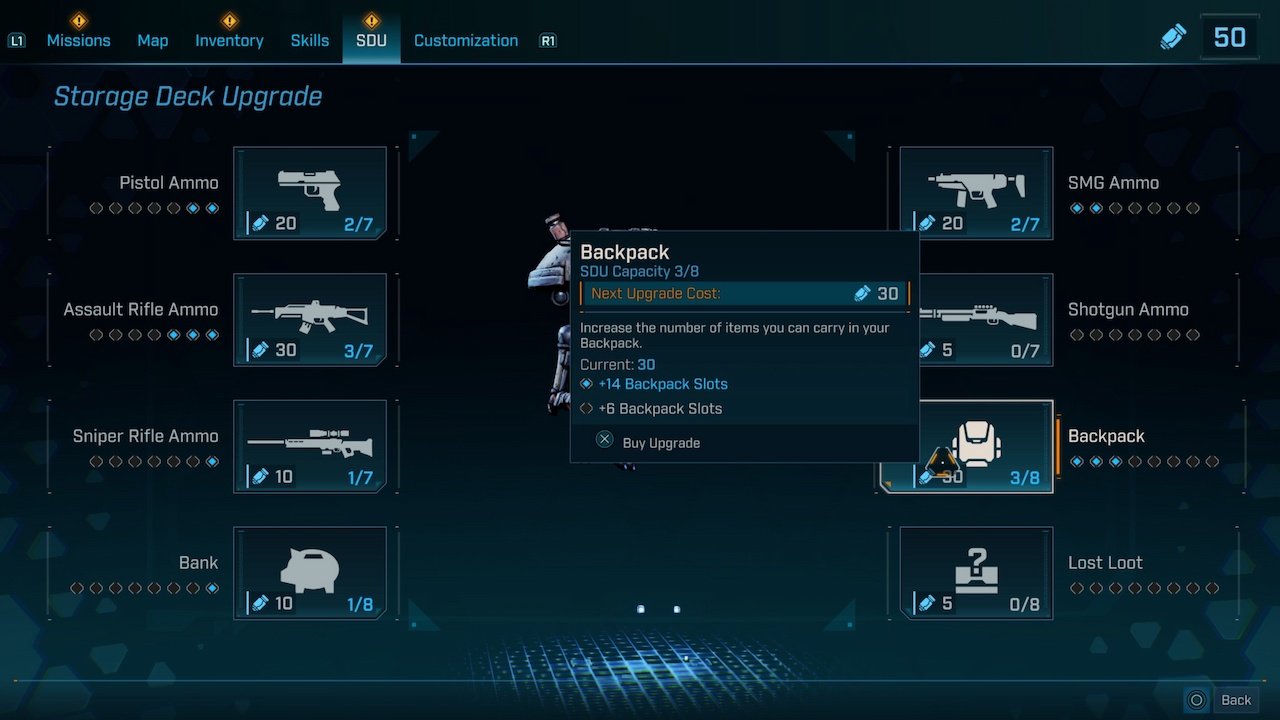
SDU tokens are a currency you accumulate throughout the game, which you can spend on upgrades such as ammo capacity, bank space, and inventory slots. Once you have enough SDU tokens, hover over the Backpack option and select it to unlock more space.
The more upgrades you unlock, the more costly it becomes to get the next upgrade. Also, once you purchase an SDU upgrade, you cannot respec it (unlike you can with skill points), so choose your upgrades wisely.
How to unlock SDU tokens in Borderlands 4
You can earn SDU tokens in Borderlands 4 by progressing story quests, completing side objectives, and most other activities listed on your map. For example, you can clear out Safehouses and Silos to obtain some SDU tokens.
Alternatively, completing bounties and obtaining optional collectibles such as Vault Symbols and Lost Capsules grants you a few SDU tokens. Try to complete side activities as you’re making your way through the world of Kairos, and you’ll have plenty of SDU tokens in no time.
With that out of the way, you may find it useful to learn how to store and trade items in Borderlands 4.