Disclosure: This is a paid guest post. The author or an affiliated third party paid for its publication, and the article may contain promotional links. The views and opinions expressed are those of the author and do not necessarily reflect those of GameTyrant or its editorial staff.
Most AI comic generators can produce something that looks like manga: panels, screentones, speech bubbles, dramatic camera angles. Reading the page is another matter. Your eye lands on the wrong panel, a jacket changes color halfway down, or the dialogue looks almost like English.
The image is rarely the hard part anymore. What takes work is keeping characters consistent, making panels read in the right order, and giving readers dialogue they can actually follow. That’s where this guide focuses.
What an AI Comic Generator Does Well, and Where It Still Struggles
Newer anime models can lay out an entire multi-panel page in one generation and keep the art style steady from panel to panel. In PixAI’s published interview with manga creator Mirai, the creator’s first reaction to Tsubaki.3’s manga pages was surprise that the result read like genuine manga rather than a generic AI image.
The recurring problems are easy to recognize:
Long English dialogue. Mirai’s side-by-side test found that longer English lines came out garbled, while Japanese rendered cleanly.
Crowded layouts. Add more panels and characters, and there are more chances for something to go wrong.
Precise actions. Ask for a character “lifting it with both hands,” and you may get someone merely “touching” the object.
Page-to-page continuity. Each new page is another generation, giving the character another chance to drift unless you anchor the design.
Plan your workflow around these limitations.
Step 1: Lock the Character Before the Story
It’s tempting to jump straight into page one. Get the character right first.
When PixAI documented the production log of a five-page manga zine, the team explored several design directions, picked one, refined it, and then turned the final design into a front, side and back turnaround before drawing a single panel. The turnaround answered questions a single illustration cannot: what the hair looks like from behind, which side the bag hangs on, whether the boots still match the outfit in profile. The log calls it the step that looked easiest to skip and the one they least wanted to recreate later.
Save the character’s core colors as well. You’ll need them when checking later pages for drift. PixAI’s character sheet guide walks through turnarounds and expression sheets if you want a fuller set.
Step 2: Describe the Page, Not the Plot
“She finds a strange machine in the ruins” tells you what happens. The model still needs to know what to draw in each panel.
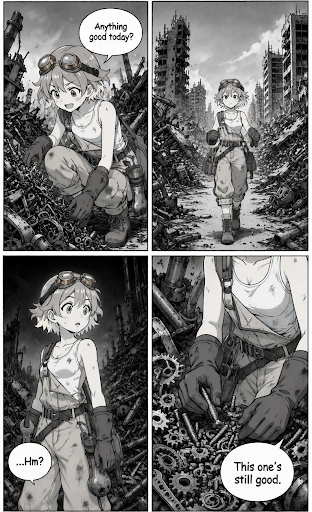
Break each beat down one level further: panel position → camera → action → dialogue. The zine log’s second page turned that one line into something like this:
Top-right panel, medium overhead shot: she kneels beside a scrap pile and moves broken metal aside with both hands.
Top-left panel, close-up: a machine core appears beneath the debris, glowing faintly.
Bottom panel: she lifts the core out with both hands, eyes wide.
Mirai’s prompts follow a similar structure: page composition first (panel count, border style, where the bubbles sit), then each character’s appearance, then each panel in order with shot type, action, background and dialogue. Mirai drafts characters and a theme by hand and then asks a general-purpose chatbot to expand them into that structure, which saves a lot of typing.
Step 3: Keep Each Page Simple
A few practical limits help:
Keep it to six panels or fewer per page. Four is even easier to manage.
Keep dialogue short, or skip it. An expression-driven silent panel usually comes out cleaner than a talk-heavy one.
Only describe what’s in frame. For a waist-up close-up, you don’t need to mention shoes. Off-frame details just give the model more to juggle.
Specify the reading direction. Tsubaki.3 defaults to right-to-left, the Japanese reading order. For a left-to-right comic, say so explicitly.
Begin at medium resolution. Move up to a larger size if the small panels look blurry.
Step 4: Generate the Page, Then Edit the Panel
If a page is 90% right, regenerating the whole thing to fix one panel risks losing the parts that already work. The zine log describes exactly this: one page had the right setting, the right character and readable panels, but the main action was wrong. The team edited only that action and kept everything else. Its rule of thumb is worth borrowing: generate globally, edit locally.
Step 5: Letter English Dialogue Yourself
For English comics, letter the dialogue yourself. Let the model draw the speech bubbles, but keep generated text very short or leave the bubbles empty. Add the final lines in an image editor.
The advantages are practical. You control spelling and font, can fix a line without regenerating the artwork, and can translate the page later. Free tools such as Krita or Photopea handle simple lettering well, and a dedicated comic font does more for readability than any prompt. If you are making a Japanese page, generated text is far more reliable and may not need this step.
Manga Page, 4-Koma or Webtoon?
| Format | Layout | Works best for | AI-specific note |
|---|---|---|---|
| 4-koma | Four panels stacked top to bottom | Gags, slice-of-life, character intros | The easiest first project: fixed layout, one joke, short lines |
| Manga page | Several panels per page, traditionally right-to-left | Action, drama, longer stories | Plan panel by panel; state the reading direction |
| Webtoon | Vertical scroll, usually one panel per image | Mobile reading, romance, slow reveals | Each panel is a separate generation, so a locked character reference matters even more |
If you’re new to AI comics, start with a 4-koma. You’ll need a beginning, setup, turn, and punchline in four panels, while the fixed layout takes most composition problems off your plate.
Where PixAI Fits
PixAI is built for anime and manga styles, and its Tsubaki.3 model handles multi-panel pages directly from a full-sentence prompt. The same platform covers the steps around the page: character turnarounds, reference images to hold a character steady, character LoRAs for long-running casts, and editing tools for fixing a single panel without starting over.
It will not replace a lettering tool for English dialogue, and it does not need to. For a complete example from first idea to printed-style zine, the production log of a five-page manga zine is the most useful read; for prompt examples from a working creator, see the interview with manga creator Mirai.
Make One Page First
You don’t need a story bible. Choose one character, outline four panels, and generate a 4-koma on PixAI. Edit the panel that misses, letter it yourself, and read it the way a stranger would. If it makes sense in four panels, it can grow into five pages.