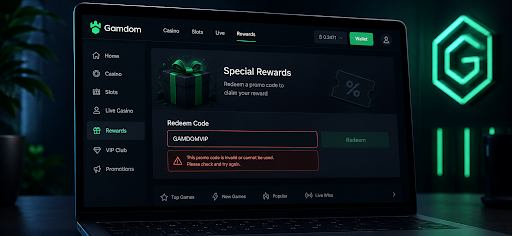
A Gamdom code that refuses to activate is annoying, especially when there is a short window to use it. The good news: the problem is often something simple — a typo, the wrong field, an expired activation window, or an account that does not meet the promotion rules.
Before trying random fixes, check the current Gamdom bonus code and its terms. Gamdom affiliate codes can only be added during the first six hours after registration, so timing matters.
This guide covers the quickest checks first, then moves through the less obvious reasons a code may fail.
Quick Diagnostic Checklist
Start with the basics. There is little point in clearing a browser cache if the code was simply entered in the wrong place.
Check the code for typos. Copy and paste it where possible, and make sure there are no spaces before or after it.
Check whether the offer is still active. Affiliate campaigns and promo codes can change or expire.
Confirm eligibility. Some promotions only apply to new users or accounts from supported countries.
Check the activation window. Gamdom affiliate codes must be added within six hours of registration.
Use the correct field. Gamdom directs users to Rewards → Special Rewards, where they can enter the affiliate code below the activation option.
Check whether a code is already attached to the account. Once an affiliate code has been added, Gamdom does not allow it to be changed.
Review other active promotions. If the issue involves a separate deposit bonus or campaign, another active reward may have its own restrictions. Check the terms before canceling or forfeiting anything.
| Problem | First Thing to Check |
|---|---|
| Code shows as invalid | Spelling, spaces, and current offer |
| No place to enter the code | Open Rewards → Special Rewards |
| Code field no longer works | Check whether the 6-hour window has passed |
| Different code already appears | Affiliate codes cannot be changed once added |
| Promotion does not appear | Check eligibility and regional restrictions |
| Page is not responding | Refresh, clear cache, or try another browser |
Step-by-Step Fixes for Code Activation
Fix 1: Ensure Correct Code Entry
First, make sure the code is going into the right field.
Gamdom affiliate codes are added from the Rewards area. Open Special Rewards, find the activation section, and enter the code there.
Copying and pasting is safer than typing a long code manually. Just check that the pasted version does not include an extra space at the beginning or end.
There is another important limitation: Gamdom only allows an affiliate code to be added within the first six hours after account creation. If the account is older than that, repeatedly re-entering the code will not solve the problem.
Once a code has been successfully added, it cannot be replaced with another one.
Fix 2: Meet All Bonus Requirements
Not every casino promotion works the same way.
Some bonuses require a qualifying deposit, exclude certain payment methods, or only work for new accounts. Others come with wagering requirements that must be completed before bonus funds or winnings can be withdrawn.
That distinction matters with Gamdom.
The standard affiliate-code reward boosts Instant Rakeback to 15% for the first seven days. It is not the same as a traditional deposit-match bonus with a separate bonus balance.
However, an affiliate code can also connect an account to other promotions, such as free spins or reload offers. Those rewards may have their own eligibility rules.
Before assuming the code is broken, check:
whether the promotion is for new users only;
whether a deposit is required for the specific reward;
minimum or maximum deposit rules;
eligible payment methods;
game restrictions;
expiry dates;
wagering or rollover requirements, where applicable.
Wagering requirements tell you how much must be bet before restricted bonus funds or bonus winnings become withdrawable. For example, a 20x requirement on a $50 bonus would require $1,000 in qualifying wagers.
That does not mean every Gamdom affiliate reward carries a rollover. The terms depend on the specific promotion attached to the account.
Fix 3: Clear Cache and Disable Extensions
If the code and account are eligible but the page itself is misbehaving, the browser may be the problem.
Try these quick fixes:
Refresh the Gamdom page.
Sign out and back in.
Clear the browser cache and cookies.
Temporarily disable AdBlock or other extensions that may interfere with page elements.
Make sure JavaScript and cookies are enabled.
Try the Rewards page again.
A VPN can also create location inconsistencies. If one is running, turn it off and access Gamdom from the actual supported location.
Do not use a VPN to bypass a country restriction. Geographic restrictions can also affect later verification and account access.
Fix 4: Try a Different Device or Browser
Still nothing? Switch environments.
If the problem appears in one browser, try Chrome, Safari, Firefox, or Edge. On mobile, open the web version directly instead of relying on an in-app browser.
The reverse can work too. If the desktop page has stopped responding correctly, try Gamdom from a phone or tablet.
This is a common redemption fix across online services because the code itself may be valid while cookies, extensions, saved sessions, or an outdated page cause the error.
Understanding the "Hidden" Reasons Codes Fail
Sometimes nothing is technically wrong with the code. The account simply does not qualify for it.
Region Restrictions
Casino offers can be geo-restricted. If Gamdom does not accept users from a particular country, an affiliate promotion will not override that restriction.
The same applies when a campaign only targets selected markets.
Using a VPN does not change the underlying eligibility rules. Gamdom can request identity or location verification, so account details should always match the player's actual information.
Country-Specific Codes
A promotion seen on one affiliate page may not be available everywhere.
Some offers run only in selected regions, currencies, or acquisition campaigns. Always compare the promotion shown on the landing page with the terms available after opening Gamdom.
If they do not match, confirm the offer before depositing.
One-Time Use
Affiliate codes are not designed to be swapped repeatedly.
Gamdom states that once an affiliate code has been attached to an account, it cannot be changed. Trying a second code after that will not replace the original one.
The six-hour rule adds another limit: if no affiliate code was added during that initial period, the normal activation window has already closed.
What to Do If Nothing Works: Contacting Support
If the code still does not activate after the checks above, contact Gamdom directly rather than repeatedly creating accounts or trying different locations.
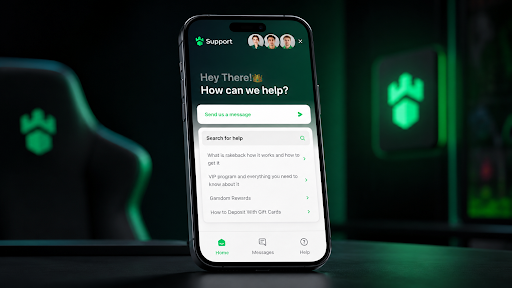
Live Chat: available through Gamdom and usually the quickest option for an account-specific problem.
Email: support@gamdom.com
Give support enough information to investigate the issue without several rounds of follow-up.
Have these details ready:
Gamdom username;
email linked to the account;
the code being entered;
approximate registration time;
screenshot of the error;
device and browser being used;
brief description of what happens after clicking activate.
| Contact Method | Best For | What to Include |
|---|---|---|
| Live chat | Fast troubleshooting | Username, code, screenshot |
| Issues that need a longer review | Account email, code, screenshots, error details |
Do not send passwords, private keys, seed phrases, or other sensitive login credentials to support.
FAQ
Why is my Gamdom code not activating?
The most common reasons are a typo, an expired promotion, regional restrictions, using the wrong redemption field, or missing the activation deadline.
For Gamdom affiliate codes, one rule is especially important: the code must be added within six hours after registration. Once a code has already been attached to the account, it cannot be changed.
Can I use a VPN to activate a restricted Gamdom code?
No. A VPN should not be used to bypass Gamdom's geographic restrictions.
The casino may request identity or location verification later, and account information must meet the platform's eligibility rules. If a promotion is unavailable in the actual location, contact support rather than trying to circumvent the restriction.
What are wagering requirements?
Wagering requirements, also called rollover requirements, specify how many times bonus funds or qualifying winnings must be wagered before they can be withdrawn.
For example, a $50 bonus with a 20x wagering requirement would require $1,000 in qualifying bets.
Not every Gamdom reward uses this model. The 15% boosted Instant Rakeback connected with eligible affiliate codes works differently from a traditional deposit-match bonus, while separate free-spin, reload, or promotional offers may come with their own terms.
Disclosure: This is a paid guest post. The author or an affiliated third party paid for its publication, and the article may contain promotional links. The views and opinions expressed are those of the author and do not necessarily reflect those of GameTyrant or its editorial staff.